Features
Icon grids, use cases, a product tour, a bento grid, steps, integrations, numbers, a comparison, and security.
The details
The quiet features your team will use every day
Nobody picks a help desk for its permission settings. These are the parts that make a busy Monday feel ordinary.

Roles and permissions
Decide who can reply, who can edit workflows, and who can only read. Contractors see just the views you share with them.

Saved replies
Write the answer to a common question once, then drop it into any reply with the customer's name and order already in place.

Collision warnings
When a teammate opens the request you are reading, you both see a banner before anyone sends a second answer.

Business hours
Set opening hours and holidays for each team, so reply targets pause overnight and customers get an honest automatic reply.

Views and tags
Save a filtered list for returns, billing, or your biggest accounts, and let tag rules sort new requests into it as they arrive.

API and webhooks
Read and update requests through the REST API, or post an event to a webhook whenever a request changes.
Use cases
Built for support, and for the teams next door
Hassium started in customer support. Now the same inbox and workflows handle billing questions, onboarding, and internal help desks as well.

Customer support
Answer email, chat, and form requests from one queue, with an owner on each and nothing left unread over the weekend.

Operations
Turn returns, bookings, and change requests into workflows with approvals, so the same job is done the same way every time.

Billing
Sort out refunds, failed payments, and invoice questions with the customer's payment history open beside the request.

Onboarding
Collect what a new customer needs to send you through an intake form, then follow each account until it goes live.
IT help desk
Give staff one place to ask for a laptop, a password reset, or access to a tool, and route each request to the right person.

Sales handoffs
When a deal closes, pass the account to support with the notes attached, so the customer never has to repeat their story.
Product tour
The three screens your team will live in
Most of the work happens in the inbox, the workflow builder, and reports. Here is what each one does for you.
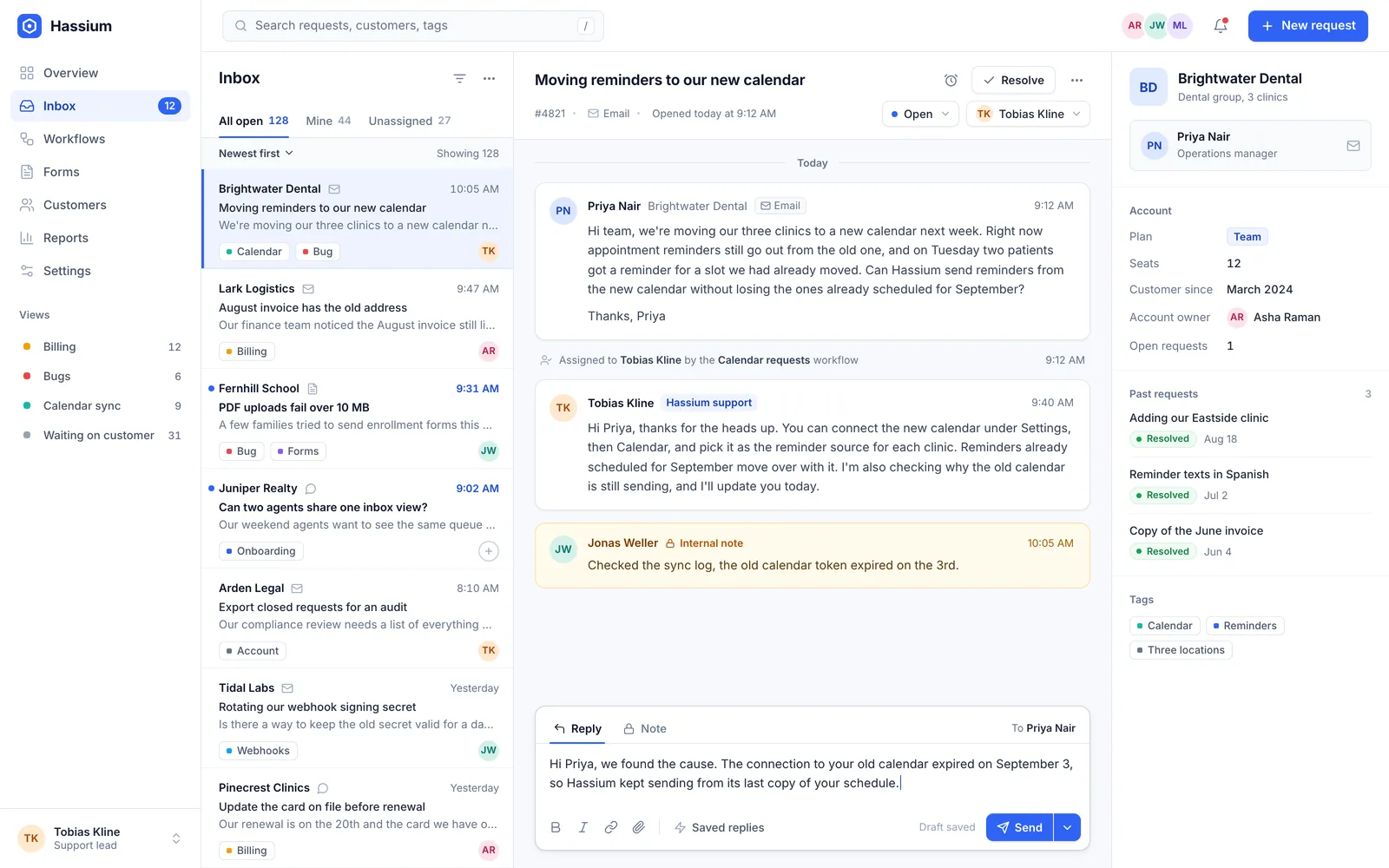
Inbox
Every conversation, with its history attached
Open a request and the customer's past orders, earlier replies, and team notes sit right beside it. Answer it, hand it to a colleague, or snooze it until Tuesday.
- Owners and due dates on every request
- Notes your customers never see
- Search that finds any word in any thread
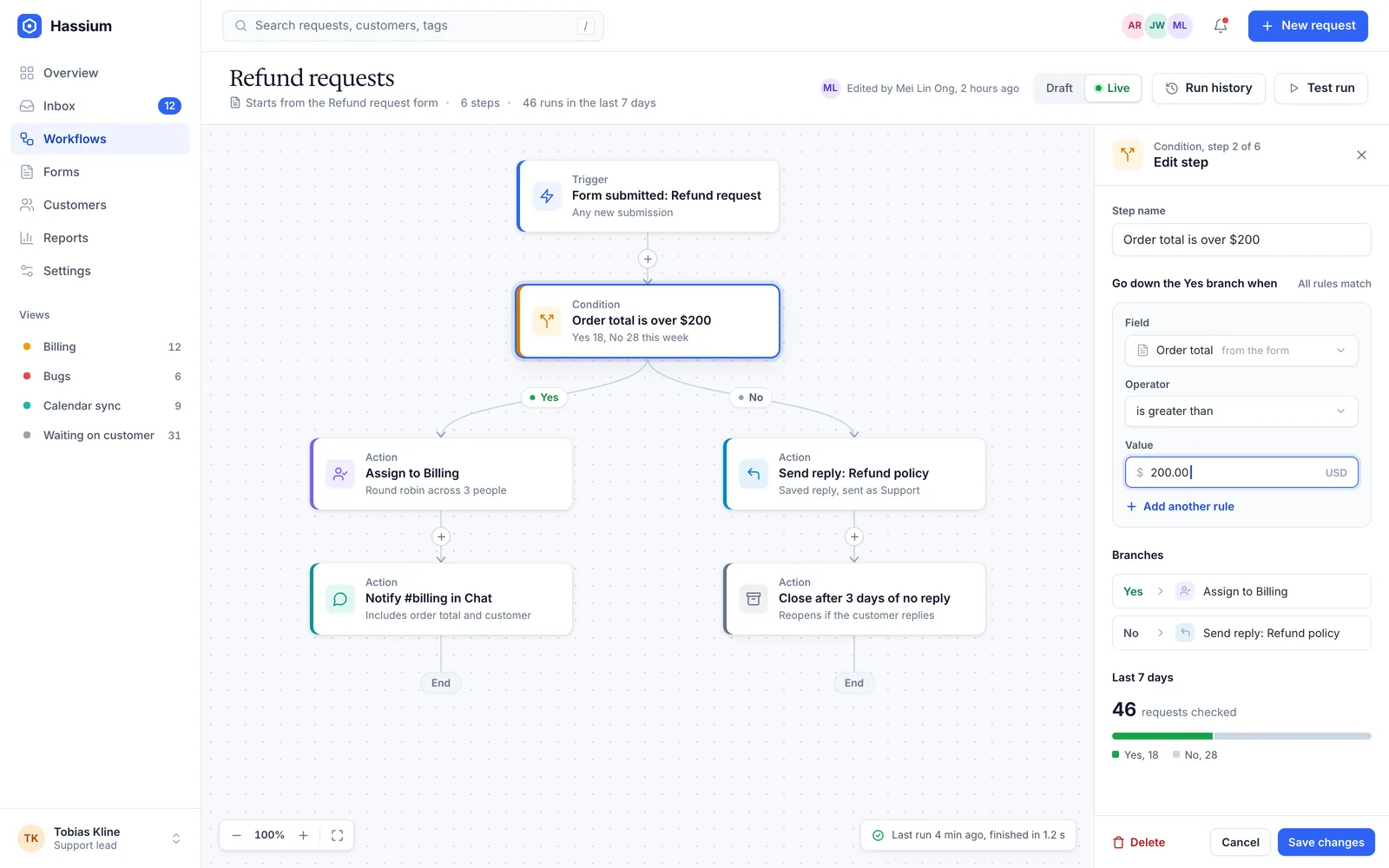
Workflows
Write the rule once and let it do the sorting
Pick a trigger, add conditions, and choose the actions. Branches catch the exceptions, delays wait for a reply, and approvals hold anything risky until a person says yes.
- Start from a form, a tag, or a schedule
- Try a draft on last month's requests
- Read the log of every step it took
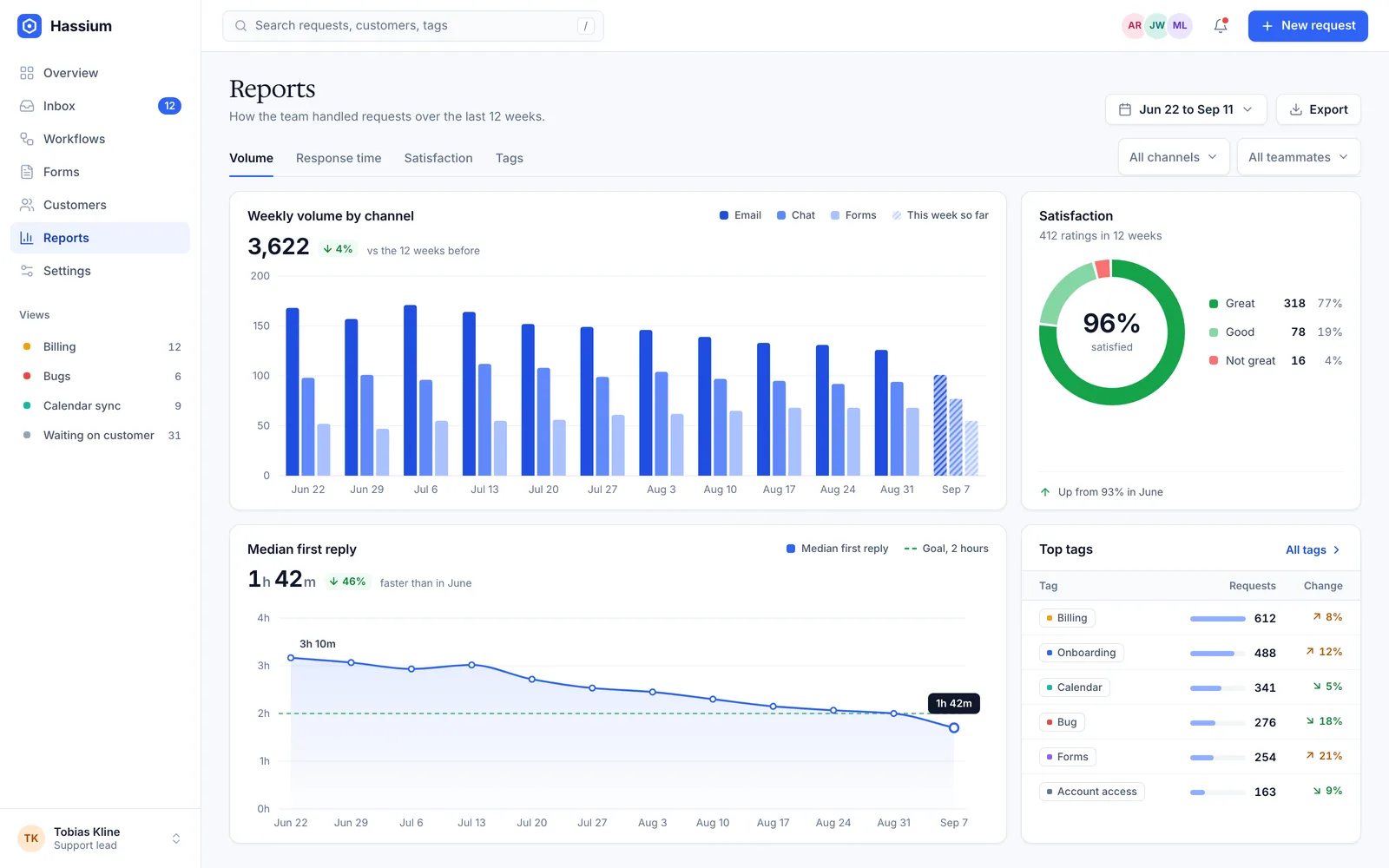
Reports
Find the slow spots before customers do
See volume by channel, reply time by week, and satisfaction by team, so you know which queue needs another pair of hands.
- Reply times for each team and tag
- A backlog you can compare week to week
- A summary in your inbox every Monday
For team leads
Run the weekly review in ten minutes
Reports gather the numbers a team lead gets asked for every week, from reply times to the tags that keep coming back, and keep them current without anyone touching a spreadsheet.
- First reply and resolution time by team
- Backlog by day, tag, and channel
- Satisfaction after every closed request
- Filters for any view and any date range
- Export any chart as a spreadsheet
Inside Hassium
Built around the way requests really move
A request arrives, finds its owner, follows a workflow, and ends up in a report. Each step has its own place in Hassium.
A shared inbox that shows who is on what
Each request has one owner, a status, and a thread your team can annotate without the customer ever seeing a word of it.
Intake forms
Build a form for returns or bookings, put it on your site, and every submission arrives as a request with its fields attached.

Audit log
See who changed a workflow, exported data, or granted access, with the time and what things looked like before.
Workflows you can test first
Try a new rule on a month of real history. The test run lists every request it would have touched and what it would have changed.

Data residency
Choose the EU or the US when you sign up. Every request, attachment, and backup stays in that region.
How it works
From a crowded inbox to a short queue in four steps
No migration project and no consultant. Most of the setup is pointing your channels at Hassium and deciding who owns what.
- Connect your inbox Forward your support address and add the chat widget to your site. New requests start arriving in one list within minutes.
- Bring in your team Give each person a role, then split the queue into views by team, tag, or customer.
- Switch on a workflow Start from a refund or booking template, replay it on last month's requests, and publish it when the results look right.
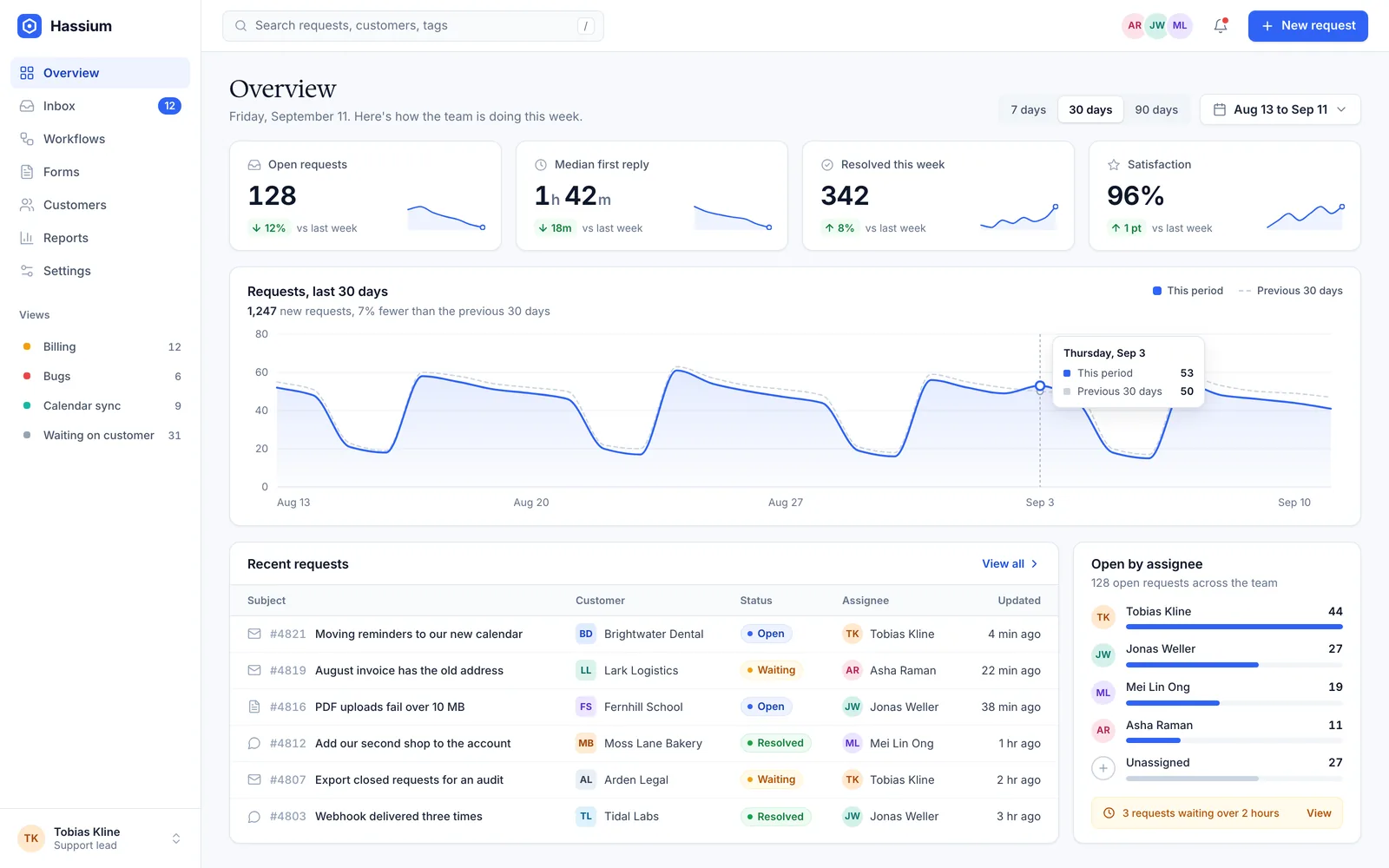
- Watch the backlog shrink The overview charts open requests and first reply time every day, so you can see the queue get shorter week by week.
Integrations
Hassium fits around the tools you already use
Connect a channel in a few clicks and a tool in a few more. Every integration is included on every plan.
Channels

Forward any support address, and replies go out from it, threaded and signed by whoever wrote them.
Chat
Add a chat widget to your site, and the conversation carries on by email after the visitor leaves.
Forms
Embed an intake form on any page and route each submission by the answers people give.
Tools

Calendar
Book a call from inside a request, and the meeting shows up on the customer's timeline.
Payments
See recent charges beside the thread and issue a refund without leaving the request.

CRM
Keep companies and account owners in sync both ways, so sales can see every open request.

Spreadsheets
Import old requests from a spreadsheet, and export any view back to one on a schedule.

Webhooks
Send an event to any address when a request is created, tagged, assigned, or closed.
REST API
Read and write requests, customers, and tags with personal tokens and a documented API.
How Hassium teams are doing this year
1,400
38 min
71%
4.6/5
Compare
What changes when you leave the shared mailbox
A shared mailbox works until the second person starts replying. Here is the difference, line by line.
| Feature | Shared mailbox | Hassium |
|---|---|---|
| Where requests arrive | Email only | Email, chat, and forms |
| An owner for each request | Partly | Yes |
| Warning before two people reply | No | Yes |
| Private notes for the team | Forwarded emails | Yes, in the thread |
| Routing and reminders | Basic filters | Workflows you can test |
| Reply time and backlog reports | No | Yes, by team or tag |
Security
Security your IT team can sign off on
Clinics, schools, and law firms run their front desks on Hassium. These are the controls they ask about first.
Single sign-on
Sign in through your identity provider with SAML or OpenID Connect. Remove someone there and their access here ends too.
Audit log
Every sign-in, export, permission change, and workflow edit is recorded with who made it and when.
Encryption
Data is encrypted in transit with TLS and at rest with AES-256, and so is every backup.
Data residency
Keep requests, files, and backups in the EU or the US. You pick the region when you create the workspace.